Log care in one tap
Watering, fertilizing, pruning, misting, or rotating — log it right from the plant card, and it’s saved to that plant’s care journal automatically.



Julie Assistant
Julie Assistant is a free, web-based dashboard that helps you track every houseplant you own — no app download required. Log each plant, calculate exactly how much water it needs, and see everything due for care in one place, backed by the Healthy Houseplants knowledge base.
Free to start No download required
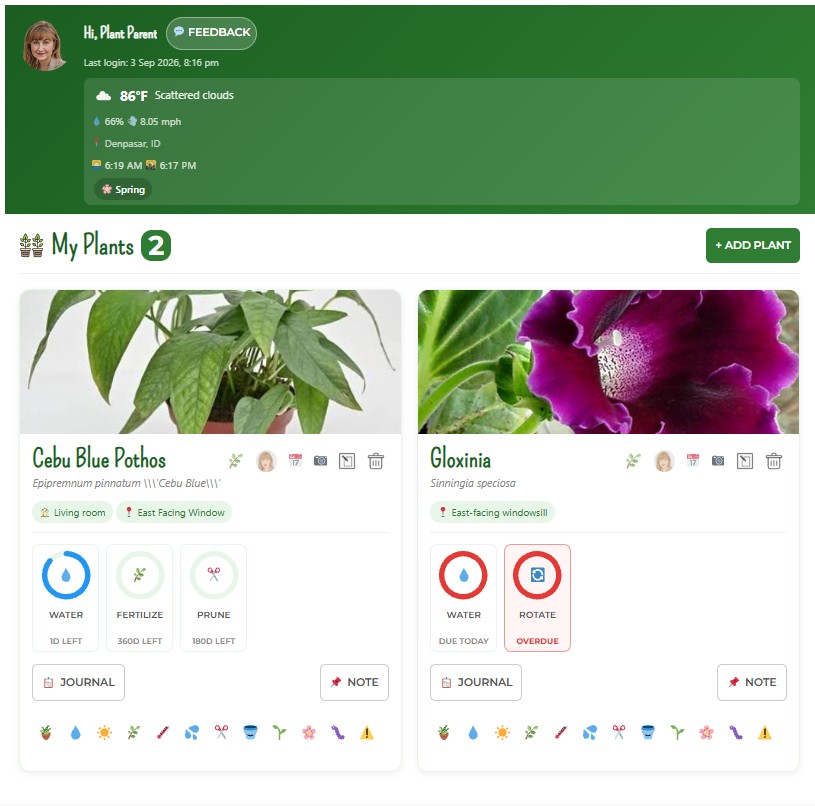
Julie Assistant is the free, no-download plant-tracking dashboard from Healthy Houseplants.com. It logs every plant you own, calculates exactly how much water each one needs, tells you when care is due, and keeps a running history — built on horticulturist Julie Bawden-Davis’s own houseplant knowledge base rather than a generic, anonymous AI model.
Answers your plant questions, day or night — care advice, troubleshooting, and guidance whenever you need it.
Where you act on that advice — organizing your collection, logging care, and keeping a real record of what’s happening with every plant.
In short: the Julie Chatbot answers plant-care questions in conversation; Julie Assistant is where you act on that advice — organizing your collection and tracking real care history.
Dashboard
The moment you log in, Julie Assistant greets you by name, with your profile photo and last login front and center. Live local weather — temperature, humidity, wind, and current conditions — sits right there too, so you have real context before you make a single care decision.
From the dashboard, everything else is one tap away: My Plants, your Care Calendar, the Water Calculator, the Light Meter, and your Profile.

My Plants
Every plant in your collection lives here as its own card: common name, scientific name, an optional nickname if you’d rather call your Monstera “Gerald” than Monstera deliciosa, a photo, and its care schedule.
Watering, fertilizing, pruning, misting, or rotating — log it right from the plant card, and it’s saved to that plant’s care journal automatically.
Add photos over time and build a gallery for each plant, so you can watch its progress for yourself instead of relying on memory.
Search Julie Assistant’s library of 160+ houseplant species — drawn from the Healthy Houseplants Encyclopedia — when adding a plant, and care recommendations fill in as a starting point you can customize.
Plant Profiles
Every plant gets its own profile — identity, photos, care requirements, pot and soil details, room location, notes, and its full care history in one view. Instead of holding all of that in your head, each plant has a single place where its whole story lives.
Care Calendar
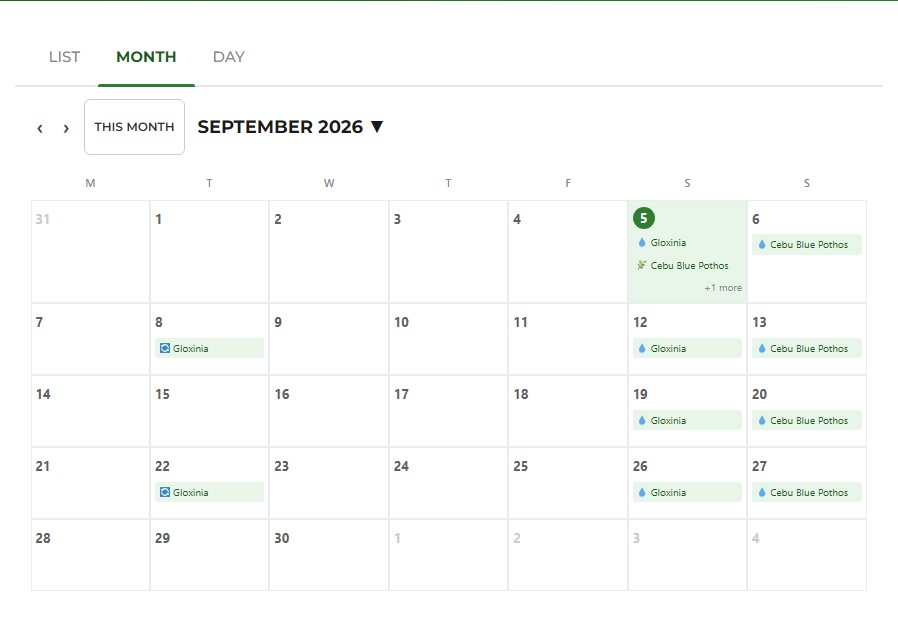
See every upcoming and overdue task across your entire collection — clearly marked, so you know exactly what needs attention today versus what’s coming up later. Due dates are calculated automatically from each plant’s care schedule and the last time you logged that activity, so there’s no manual math involved.
You can also open a calendar filtered to just one plant, right from its card.
Water Calculator
Tell the Water Calculator about the plant and its setup — species, pot size, pot material, soil type, drainage, and how much direct sun it gets — and it gives you a recommended amount and a watering interval based on that specific combination, instead of a generic rule of thumb.
Works in Imperial or Metric, and updates instantly as you change any input.
Improper watering is the single most common cause of houseplant decline (UConn Extension) — exactly what the calculator is built to help you avoid.
Try the Water Calculator free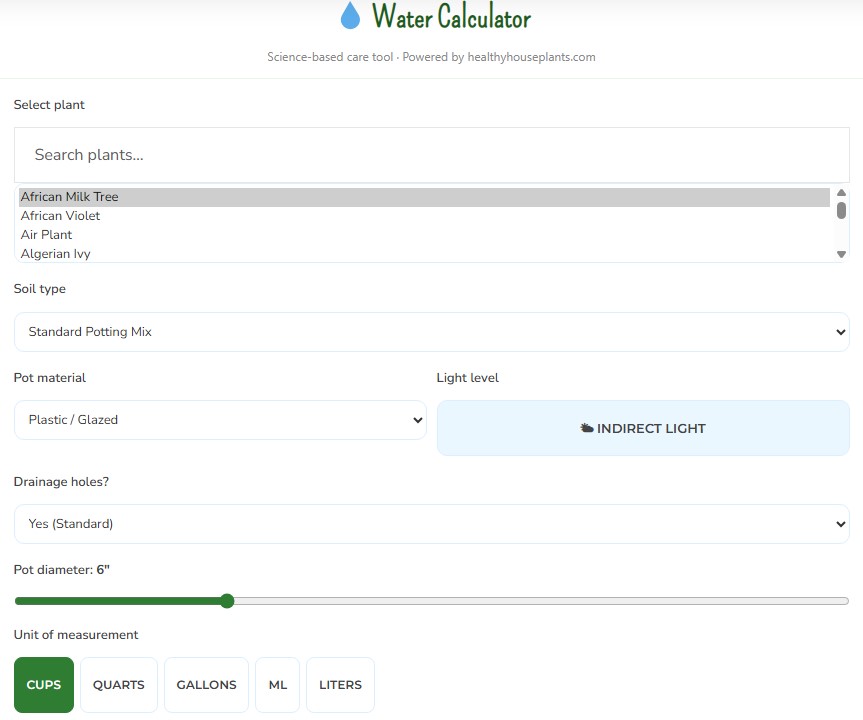
Light Meter
The Light Meter reads real-time light levels and translates them into plant-friendly terms. Compare a reading against what your plant actually needs, save it, and build a light history for every spot in your home.
The Light Meter is part of Julie Assistant’s paid plans. Curious what “bright indirect light” really means? Read the full light guide on the blog.
Weather
Your dashboard pulls in live local weather — temperature, humidity, wind, and current conditions — based on your saved location. It’s not a substitute for checking your plant directly, but it gives you useful environmental context: a heads-up on a heat wave, a dry spell, or a cold snap that might affect how your plants are doing this week.
Profile
Update your name, email, and photo, and set your location by GPS or zip code so weather stays accurate for where you actually are. Toggle between Imperial and Metric any time — Julie Assistant defaults sensibly based on your location even before you’ve set a preference.
Your location is used only to show accurate local weather on your dashboard.
Reminders
Julie Assistant sends reminders when a plant is due for care — watering, fertilizing, pruning, misting, or rotating — plus a weekly digest that rounds up everything on the horizon across your whole collection, so nothing quietly gets missed.
Care History
Every logged action builds toward a running history for each plant — what you did, and when. Instead of relying on memory, you can look back and see exactly what care a plant has actually gotten over time.
Ask Julie Chatbot — get plant-specific guidance, any time.
Get guidance — an answer built around your actual plant and setup.
Use Julie Assistant — schedule it, calculate it, log it.
Track what you did — build a real history you can trust.
Stay organized and build good habits from your very first plant.
Manage a growing collection without losing track of anything.
One centralized place for care details across dozens of species.
Let reminders and the calendar do the remembering for you.
A real system instead of scattered notes and spreadsheets.
Everything in one place. Less guesswork on watering. A dedicated record for every plant. A calendar that tells you what’s due instead of you trying to remember. Light and weather data to back up your decisions. A history you can actually look back on. It won’t make your plants grow for you — but it takes the mental load off remembering, tracking, and calculating, so you can focus on the plants themselves.
Julie Assistant’s recommendations are a helpful starting point, not a substitute for observing your own plant. For hands-on troubleshooting beyond tracking, you can also book one-on-one help with Julie.
Julie Assistant draws on the Healthy Houseplants knowledge base, developed by garden writer and indoor-gardening expert Julie Bawden-Davis. Julie Assistant’s calculators and defaults are a starting point — always adjust based on what you observe in your own space. Learn more about Julie →
Build your collection, one plant at a time.
Pot, soil, light, and room details for each plant.
Log watering and other activities as you do them.
Calendar, Water Calculator, Light Meter, and live weather.
Reminders and your care history keep you ahead of it.
A free, web-based dashboard that tracks every houseplant you own — logging care, calculating watering amounts, and scheduling reminders.
The Julie Chatbot answers plant-care questions in conversation; Julie Assistant is where you act on that advice — organizing your collection and tracking real care history.
No — it runs in your browser from your dashboard. No install required.
It factors your plant’s species, pot size and material, soil type, drainage, and sunlight exposure to recommend an amount and interval, rather than a generic rule of thumb.
The Light Meter is part of Julie Assistant’s paid plans; the dashboard, My Plants, Care Calendar, and reminders are available on the free tier.
Yes — every plant in your collection gets its own card and profile.
Diagnosis (yellow leaves, pests, root rot) is handled by the Julie Chatbot; Julie Assistant is where you then schedule and track the fix.
From the Healthy Houseplants knowledge base, developed by horticulturist Julie Bawden-Davis — not a generic third-party AI model. Learn more.
Yes — toggle any time in your Profile; Julie Assistant also defaults sensibly based on your location.
No — location is used only to show accurate local weather conditions on your dashboard.
Start organizing your plant care with Julie Assistant — less guesswork, more confidence, one dashboard.
Open My Plant Dashboard